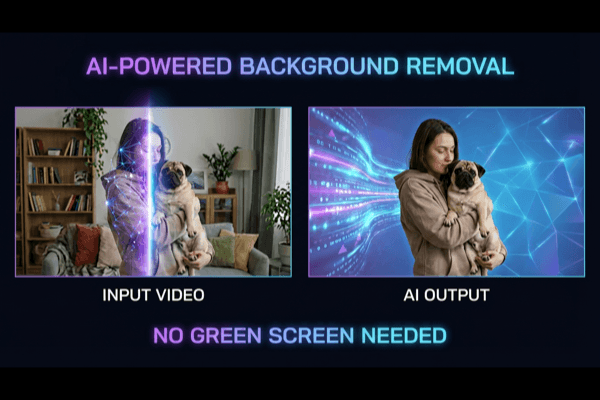
Video creation is now a weekly task for many teams, not a quarterly campaign event. Marketing departments, creators, ecommerce operators, and educators are all expected to publish more videos in less time. The challenge is that production standards have increased while deadlines have shortened. Teams need content that looks clean and professional, but they cannot afford long editing pipelines for every new clip.
Background editing is usually one of the biggest bottlenecks. Traditional workflows require either controlled studio setups or time-consuming manual masking. Both options can slow output and increase revision cycles. This is why AI-based workflows are becoming important in practical production stacks. For teams that need a simpler browser-first process, tools like Remove BG Video can reduce editing overhead and make turnaround more predictable.
The real value is not only “removing background.” The bigger value is operational: fewer blockers, faster publishing, and cleaner handoff between creative, media, and growth teams.
Most teams do not struggle with generating ideas. They struggle with execution speed. A campaign might need ten short variants across multiple channels, each with format-specific requirements. If every variant needs manual background cleanup, the entire pipeline slows down.
Typical symptoms include:
When this happens, the issue is not “creative quality.” It is production system design. AI background removal helps by turning a high-friction manual step into a repeatable process.
Some teams assume these tools only save a few minutes per clip. In practice, benefits are broader when integrated correctly.
Teams can move from raw footage to usable visual in one step, which accelerates internal review.
Once the subject is isolated, teams can test different backgrounds and visual themes quickly.
You do not always need a controlled green-screen environment for acceptable output.
Standardized background templates improve visual consistency across product pages, social clips, and ad creatives.
Editors spend less time on repetitive masking and more time on creative decisions.
AI background workflows are useful in many practical scenarios.
The pattern is the same: teams want stable output quality while increasing publishing frequency.
A simple system works better than a complicated one. A reliable baseline process looks like this:
This approach catches quality issues early and prevents expensive rework at the end of the cycle.
AI tools improve speed, but source quality still drives final output. Teams get better results when they follow a few technical basics.
Better source footage produces cleaner edges and reduces artifact risk in difficult frames.
Even with modern tools, teams repeat predictable mistakes.
Running full exports before testing a short segment increases wasted time if quality fails.
“Looks okay” is not a useful QA standard. Teams need specific checks for edge stability and subject continuity.
If channel format constraints are handled late, teams often redo exports and overlays.
Trying to fix poor recording quality in post usually increases time and lowers consistency.
A compact pre-publish checklist solves most of these issues.
A good checklist should be fast to run and clear enough for non-editors.
Recommended checks:
If this list is used consistently, approval cycles become shorter and more objective.
Most teams evaluate tools only by output quality. In operations, throughput and predictability are equally important.
Useful metrics to track:
These indicators reveal whether the workflow is truly improving execution, not just producing occasional good-looking results.
Background removal becomes more valuable when teams define clear ownership.
This reduces ambiguity and prevents repeated “who should fix this” loops during busy campaign periods.
For businesses publishing educational or product content, cleaner videos also support organic growth. Better visual quality can improve watch time, reduce bounce on landing pages, and increase trust on commercial pages.
Teams can repurpose one source clip into multiple assets:
This reuse model improves return on each recorded minute.
Any AI media workflow should include basic trust controls.
Operational trust is not only legal protection; it also improves collaboration and reduces approval friction.
If a team wants practical adoption, this phased plan works well.
Pick one repeat video format and define a baseline process. Document source recording rules.
Process 10–20 videos using the new workflow. Measure time-to-export and revision counts.
Create a fixed QA checklist and assign clear sign-off roles.
Expand to more formats and compare metrics against your previous workflow.
By the end of the month, teams usually know whether the system is reducing cycle time and improving consistency.
AI background removal is most valuable when treated as an operations upgrade, not a one-off editing shortcut. Teams that standardize recording input, run quick test loops, and enforce lightweight QA can publish faster without sacrificing quality. The result is a production pipeline that supports campaign velocity, consistent branding, and better use of creative resources.
In a market where content volume keeps increasing, the teams that win are not necessarily those with the biggest budgets. They are the teams with repeatable workflows that can deliver good output every week under real deadlines.